
Running a healthcare practice means doing far more than treating patients. Between appointments, patient records, billing, claims, diagnosis coding, follow-ups, reminders and everyday communication, practitioners can spend a surprising amount of their working day managing administration instead of focusing on clinical care.
That is exactly the problem a good practice management system should solve.
EZMed brings the core administrative functions of a healthcare practice into one connected platform. Instead of moving between calendars, spreadsheets, patient folders, billing systems, coding references and messaging tools, practitioners can manage much of the day-to-day running of their practice from a single application.
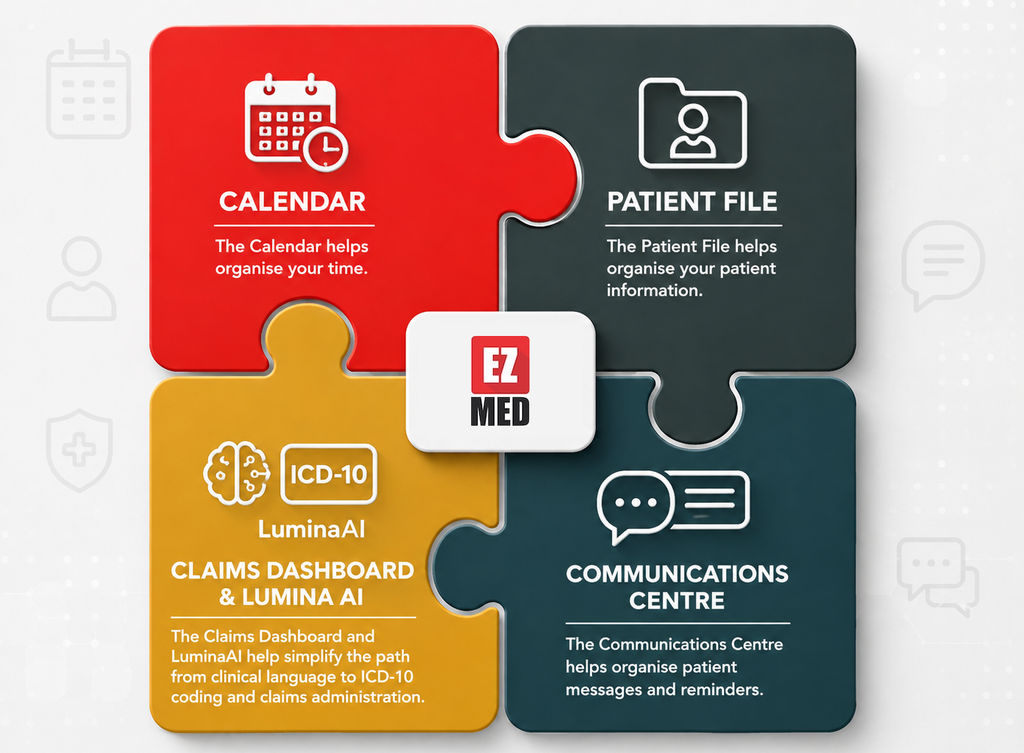
Four features sit at the heart of that experience:
- The EZMed Calendar
- The Digital Patient File
- The Claims Dashboard now powered by Lumina AI clinical coding assistant that enables natural language ICD-10 code lookup
- The Communications Centre for messages and reminders
Individually, each feature solves a specific administrative headache. Together, they create a more practical workflow from appointment booking through to patient management, billing and follow-up. Here is how they make life easier for busy healthcare practitioners.
1. The EZMed Calendar: A Clearer View of Your Working Day
A healthcare practice runs on time.
Appointments need to be booked. Patients need to arrive at the right time. Practitioners need to know what comes next. Reception staff need visibility into available appointment slots. Changes and cancellations need to be managed without creating confusion.
When the diary becomes difficult to manage, the effects are felt throughout the practice.
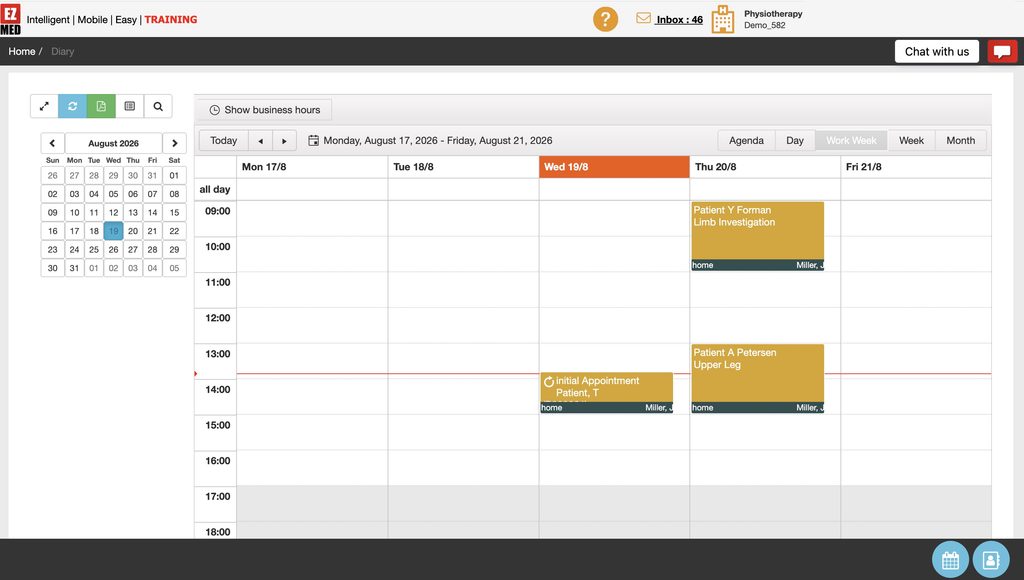
The EZMed Calendar gives practitioners and their teams a central view of scheduled appointments so they can quickly understand what the day or week looks like.
Rather than relying on handwritten diaries, separate calendars or disconnected scheduling tools, appointments can form part of the same practice management environment used to manage the patient.
See your schedule at a glance
A busy practitioner should not have to hunt through multiple screens to understand the day ahead. EZMed’s calendar gives users a visual representation of their appointments, making it easier to identify:
- Who is booked
- When they are booked
- Where gaps exist
- How busy a particular day is
- What appointments are coming up
- How the working week is structured
Practitioners can move between different diary views depending on how they prefer to work. A day view can help when focusing on today’s appointments, while work-week and weekly views make it easier to plan ahead and understand overall capacity. The familiar interface and easy to interpret visibility can make a substantial difference to the rhythm of a practice.
Reduce scheduling confusion
Scheduling problems rarely happen because someone deliberately makes a mistake.
Normally they happen because information is scattered. If your receptionist or administrator has a manual diary and a patient calls to change an appointment it becomes very difficult to synchronise these changes and double-bookings occur. Before long, two people believe they have the same slot.
A centralised digital calendar helps establish a clearer source of truth for appointment information. Everyone can access the same calendar, view the slots and edit or book patient sessions. If you’re on-the-go, your calendar will update in real-time, so you’re never out of touch.
The result is less uncertainty and a more organised experience for patients.
Plan around the real working day
Few practices run on a consistent schedule, so flexibility is key in managing your appointments and scheduling. You may have clinical appointments in the morning, administrative work in the afternoon and different availability on certain days.
Having a diary built into the practice management application makes it easier to structure appointments around the way the practice actually operates. This is particularly useful especially as you scale your practice and start to schedule repeat bookings.
From booking to patient care
The real advantage of an integrated calendar is not simply that it displays appointments. It’s that the appointment exists inside the same environment as the rest of the patient’s administrative journey.
Instead of thinking of scheduling as a completely separate task, it becomes the first step in a connected workflow:
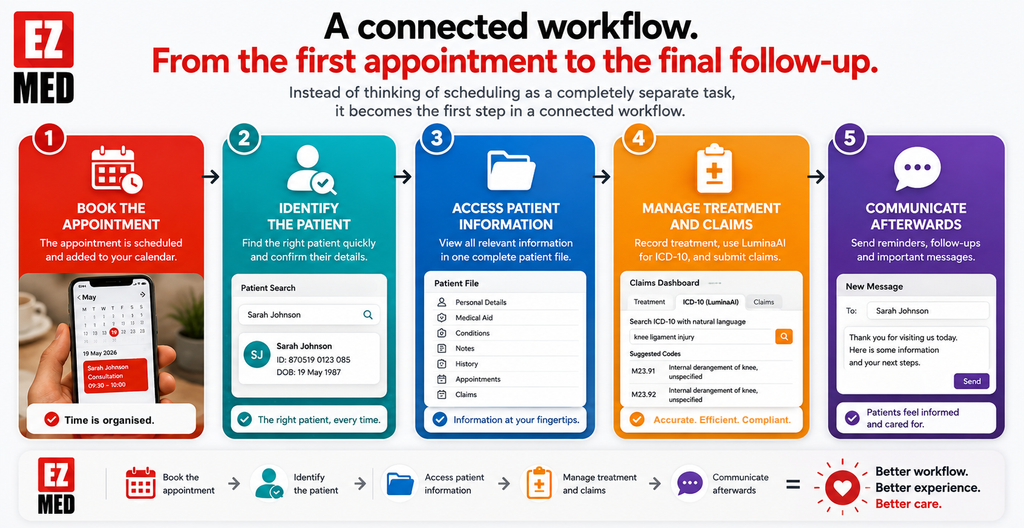
Book the appointment → identify the patient → access the patient information → manage treatment and claims → communicate afterwards.
This connection is where practice management software begins to offer far more value than a standalone calendar.
2. The Patient File: Important Patient Information in One Place
Every patient generates information that needs to be stored and managed. Initially you need to capture Personal information & contact details, Medical aid and funder information.
Once your patient journey starts this expands to maintaining a billing and appointment history, notes, claims, clinical diagnosis & treatment information and referrals. Much of this info is legislated and it’s essential that it’s stored within the POPIA and HPCSA compliant frameworks.
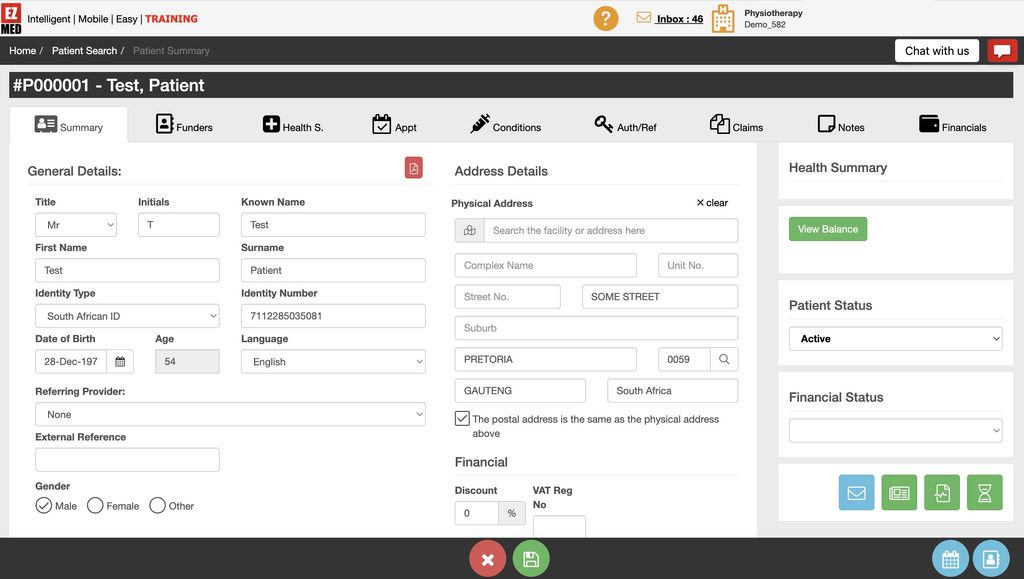
As the number of patients grows, so does the amount of information a practice needs to manage. The EZMed Patient File gives practitioners a central place to manage the information associated with each patient. This reduces one of the biggest frustrations in practice administration: finding the right information when you need it.
A more organised patient record
We beleive that practitioners shouldn’t have to search through physical folders, emails, spreadsheets and separate databases before or after an appointment. The EZMed Patient File brings important patient information together within a structured digital profile.
From the patient summary, users can access areas relating to information such as:
- General patient details
- Address information
- Funders
- Health information
- Appointments
- Conditions
- Authorisations and referrals
- Claims
- Notes
- Financial information
Instead of thinking about each of these as isolated administrative records, EZMed connects them to the patient. That makes the patient’s record the centre of the workflow.
Find information faster
One of the hidden costs of administration is not necessarily completing a task. It is finding the information required to complete it. Consider how often a practice needs to answer questions like:
- “When was this patient last here?”
- “Which funder is associated with this account?”
- “What contact details do we have?”
- “Is there an outstanding financial item?”
- “Where are the notes from the previous interaction?”
- “Which claims relate to this patient?”
- Repeated across multiple patients every day, they add up.
Individually these questions may only take a few minutes, but over time this can rob you of productivity.
A structured patient file helps reduce that friction by keeping patient-related information within a common record.
Create continuity across the practice
Centralised patient information is especially valuable when more than one person works in the practice. A receptionist may need contact and appointment information while the practitioner requires clinical or treatment-related information. Your administrator may need access only to the claim or financial information.
When everyone works from disconnected records, information quickly becomes fragmented.
By keeping information connected to the patient file, EZMed helps create greater continuity between the different administrative functions of the practice, but also preserves the patient confidentiality by ensuring that patient clinical information is only shared as required and can only be seen by treating professionals.
The patient does not need to exist as one record in the diary, another in the billing system and another in a treatment record keeping system. In EZMed the patient remains the common point around which the workflow is organised.
Spend less time on repetitive administration
No healthcare practitioners ever entered the profession because they enjoy admin and data capturing. In fact, EZMed was developed by a South African Biokineticist, out of frustration, because there was no platform available in the market!
An integrated platform including patient records reduces the need to repeatedly search for or re-establish information that is already associated with the patient. The practical benefit is straightforward:
Less searching. Less duplication. Less administrative interruption.
This frees up more time for work that actually requires the practitioner’s expertise.
3. The Claims Dashboard and LuminaAI: Making ICD-10 Lookup More Natural
Billing and claims are among the most important administrative functions in a healthcare practice. They’re also among the most detail-sensitive. A practitioner can deliver excellent care, but the practice still needs an efficient way to capture treatment information, associate the appropriate codes and prepare claims.
ICD-10 coding is one area where administrative complexity can quickly slow a practitioner down. EZMed addresses this through its Claims Dashboard and LuminaAI powered ICD-10 natural language lookup.
Why ICD-10 lookup can interrupt a practitioner’s workflow
Healthcare practitioners generally think clinically. They think about the patient’s complaint, diagnosis, affected area and treatment.
Coding systems, however, require that clinical information be translated into structured codes. That creates a gap between the way a practitioner naturally describes a condition and the way a claims system needs that information recorded.
Traditional code lookup can require users to know exactly what code they are looking for or search through long lists of possible diagnoses. That can turn what should be a quick administrative step into a frustrating interruption.
Search using natural language
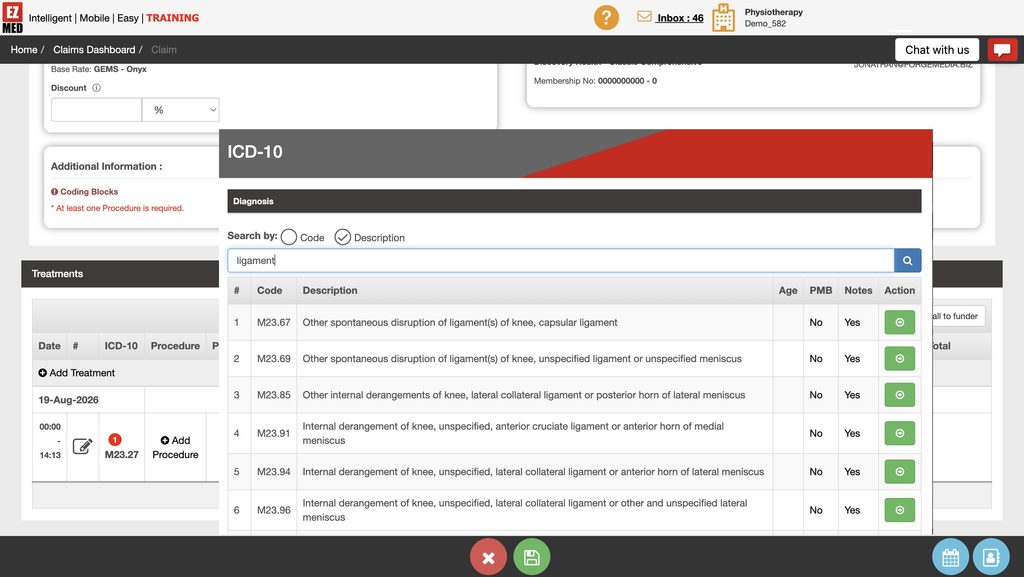
LuminaAI is designed to make the ICD-10 lookup process more intuitive by allowing practitioners to search using ordinary clinical language. Rather than requiring the user to begin with the exact ICD-10 code, the practitioner can describe what they are looking for.
For example, a practitioner may search around a term relating to a ligament, knee condition or another clinical description. The system can then surface relevant ICD-10 options for consideration. This is a small change in the interaction, but an important one.
The software begins adapting to the way the practitioner thinks rather than forcing the practitioner to adapt entirely to the language of the software.
Reduce the friction around coding
Natural language lookup does not remove the practitioner’s responsibility to select the appropriate diagnosis. What it can do is make finding relevant options faster and more practical.
Instead of: Remember code → enter code → hope it is correct
the process becomes closer to: Describe condition → review relevant results → select the appropriate code
That is a much more natural workflow.
For practitioners who do not spend their entire day working with coding tables, this can make the claims process considerably less intimidating.
Keep claims closer to the clinical workflow
The Claims Dashboard also helps bring treatment and claim-related activity into the broader EZMed environment.
Rather than treating billing as an unrelated back-office process, claim information can form part of the workflow associated with the patient and their treatment.
That creates a stronger connection between:
Patient → appointment → treatment → diagnosis → procedure → claim
Reducing the number of disconnected steps matters because every manual handoff creates another opportunity for missing information, delays or extra administration.
Better software does not make practitioners think like accountants
That is an important distinction. A healthcare practitioner should not need to become a software specialist, billing administrator and coding expert simply to record the work they have performed.
Practice management software should take complexity that already exists and make it easier to manage. LuminaAI’s natural language ICD-10 lookup is an example of that philosophy in practice. The complexity of the ICD-10 framework still exists, but interacting with it becomes more approachable.
4. The Communications Centre: Keep Patient Messaging Inside the Practice Workflow
Communication is an essential part of patient management with lots of variables depending on the type and lifecycle of the patient.
For instance, one patient needs an appointment reminder, while another needs information before a consultation. Someone else needs a follow-up message. Every so often the practice may need to communicate an administrative update such as holiday times, or pricing changes.
Without a proper system, those messages can end up scattered across phones, personal inboxes, handwritten notes and unrelated messaging platforms.
EZMed’s Communications Centre gives the practice a dedicated area for sending and managing patient communication.
Bring communication closer to the patient journey
Messaging should not feel like an entirely separate activity from managing the practice. Appointment reminders, administrative updates and follow-up actions should be be frictionless and not waste administrators time jumping between systems.
By giving users a communications area within the practice management environment, EZMed helps keep those activities closer together.
Send messages and reminders
One of the most obvious applications is appointment communication. Missed appointments are frustrating for both the practice and the patient.
For the practitioner, an empty appointment slot represents time that could have been used to see another patient. For the patient, forgetting an appointment may delay treatment.
Reminders provide a simple way to help reduce this problem.
Instead of relying entirely on staff members to remember whom they need to contact, communication can become part of a more organised administrative process.
Keep communication organised
A dedicated communications centre also gives users a clearer environment for managing outgoing messages. Users can work with areas such as the inbox, sent items and message composition, while filtering communication by date and searching for relevant information.
That is particularly useful when someone later asks:
“Did we contact this patient?”
“When was the message sent?”
“What did we send?”
Without a central communication history, answering those questions can mean searching through an individual’s phone, email account or notes. Centralising practice communication makes that history easier to manage.
Build a more professional patient experience
Patients experience a practice through more than the consultation itself.
They also experience:
- How easy it is to make an appointment
- Whether the practice communicates clearly
- Whether reminders arrive
- How organised the administration feels
- How smoothly follow-ups happen
- Whether staff appear to have access to the right information
These interactions shape the patient’s perception of the entire practice. A practitioner may deliver outstanding clinical treatment, but poor administration can still create a frustrating experience. An integrated communications function helps close that gap.

The Real Benefit: Four Features Working Together
The individual tools are useful. The bigger benefit comes from connecting them.
Imagine a fairly normal patient journey.
A patient contacts the practice and makes an appointment.
The appointment appears in the EZMed Calendar. When the patient arrives, the practitioner accesses their Patient File and works from the information associated with that patient.
Treatment information can then feed into the Claims Dashboard, where the practitioner can use LuminaAI’s natural language ICD-10 lookup to help find the relevant diagnosis code.
Following the visit, the Communications Centre can be used for the appropriate patient messaging or reminders.
Four different administrative requirements. One practice management environment. That is the difference between having several digital tools and having a connected practice management workflow.
Less Switching Means Less Friction
One of the biggest productivity problems in modern businesses is context switching.
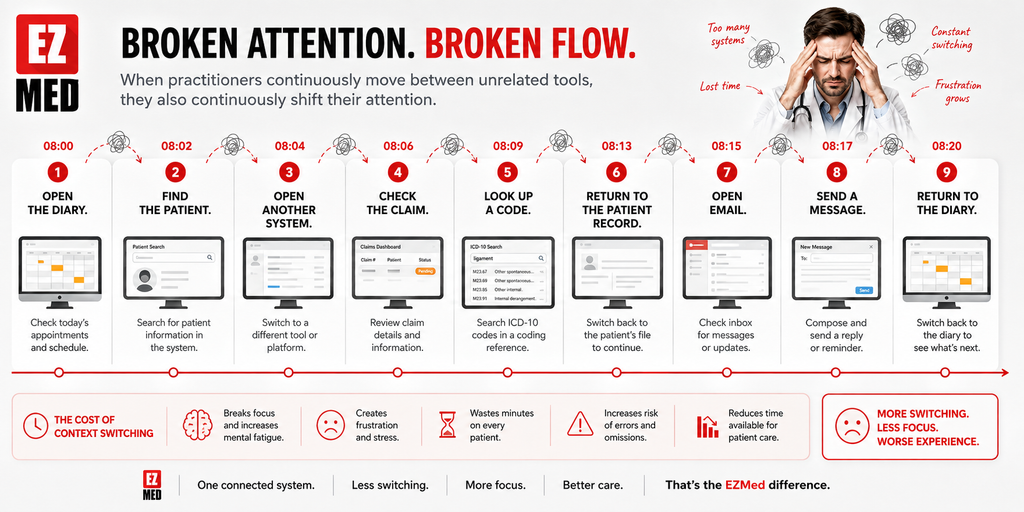
Healthcare practices are no exception. When practitioners continuously move between unrelated tools, they also continuously shift their attention.
- Open the diary.
- Find the patient.
- Open another system.
- Check the claim.
- Look up a code.
- Return to the patient record.
- Open email.
- Send a message.
- Return to the diary.
Every individual step seems small. Combined, they create considerable friction.
EZMed’s approach is to bring the essential functions of practice administration closer together. The goal isn’t just to digitise paperwork. Our intent is to reduce the friction and effort for both practitioners and patients.
Practice Management Software Should Give Practitioners Time Back
Technology in healthcare often becomes more complicated than the problem it was supposed to solve. That should not be the objective. A practice management application should make everyday work easier.
- A calendar should make the schedule clearer.
- A patient file should make information easier to find.
- A claims system should make administration more manageable.
- An ICD-10 lookup should help practitioners find relevant coding options without unnecessary searching.
- A communications centre should make it easier to keep patients informed.
When those functions work together, the result is something much more valuable than a collection of software features.
It’s time.
Time that would otherwise have been spent looking for information.
Time spent checking diaries.
Time spent searching through codes.
Time spent trying to establish whether someone contacted a patient.
Time spent moving data and information from one system to another.
For a busy healthcare practitioner, saving a few minutes repeatedly throughout the day can have a meaningful impact.
Make the admin side of your practice easier with EZMed
Your practice already has enough moving parts. Your software should help bring them together. With scheduling, patient management, claims, LuminaAI-assisted ICD-10 lookup and patient communications integrated into one practice management environment, EZMed helps healthcare practitioners manage more of their working day without adding unnecessary complexity.
Spend less time managing administration and more time managing your practice.
Discover EZMed and see how a more connected practice management workflow can simplify your day.